⌕
Find candidates
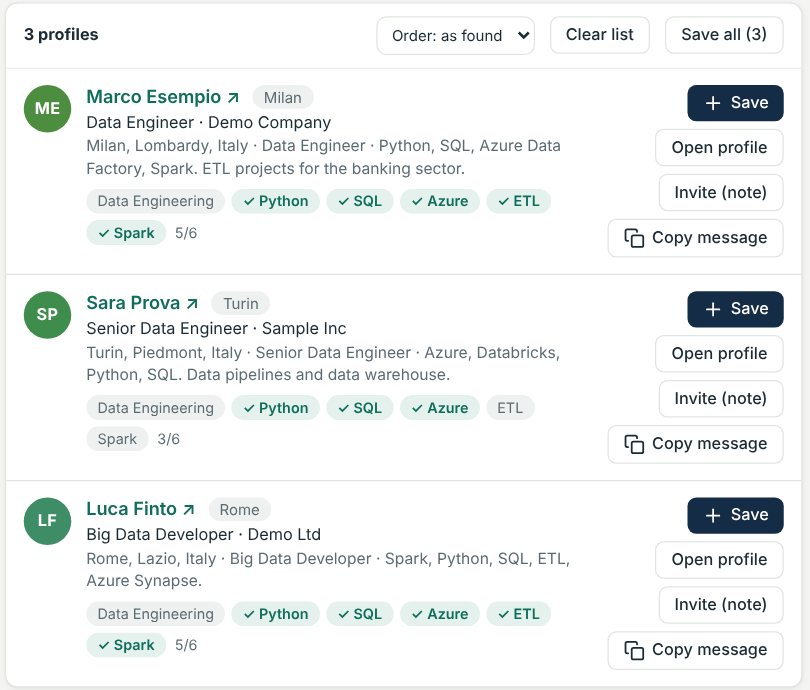
Paste the job description: the program prepares the searches, reads the LinkedIn profiles you copy and shows which skills they have. Connection note and message already written. 21 countries or worldwide.
ATS and CRM for recruiters
JobDesk CRM is the ATS and CRM for people who recruit: find the right profiles, manage your pipeline and message on WhatsApp and LinkedIn with ready-made texts. Install it on your PC and pay once.
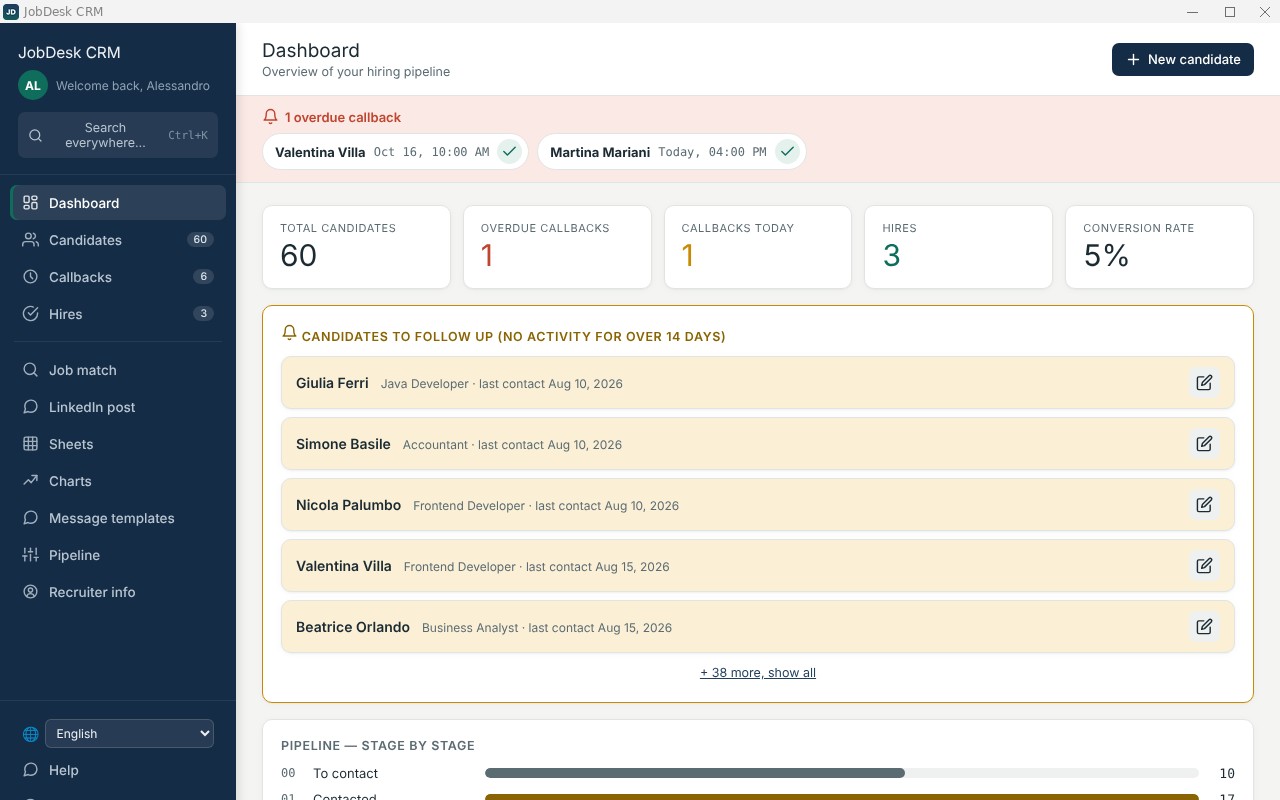
From the first application to the interview, all the way to the hire: organize your work without depending on a monthly subscription and without keeping everything scattered across spreadsheets, emails and notes.
A recruiting software designed to manage candidates, hiring, pipelines, activities and the daily organization of recruiters' work.
Paste the job description: the program prepares the searches, reads the LinkedIn profiles you copy and shows which skills they have. Connection note and message already written. 21 countries or worldwide.
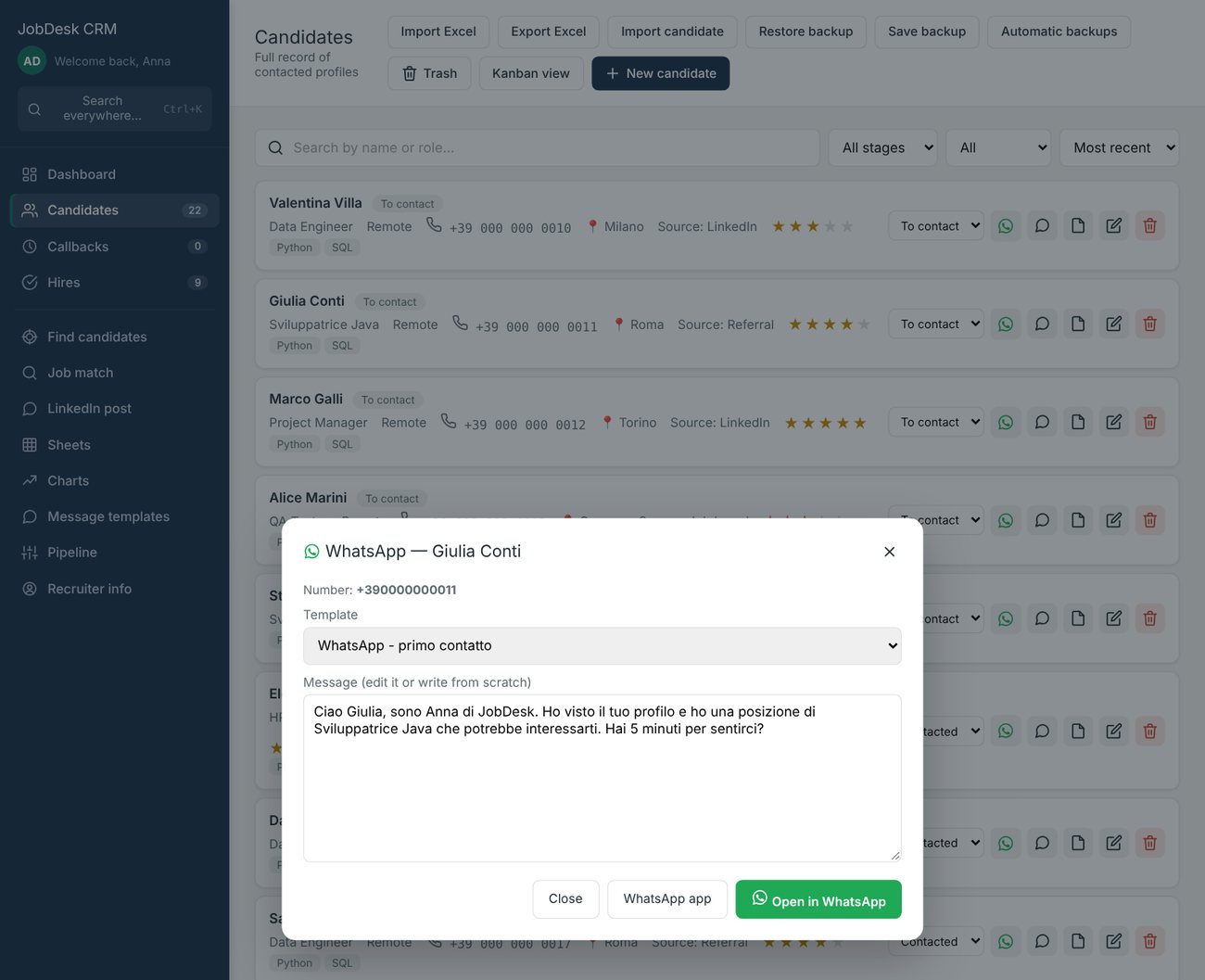
Message the candidate in one click, with a template or free text. Numbers from anywhere in the world, in the browser or in the WhatsApp app.
One box to find candidates, sheets and templates from any page of the program.
Full candidate records, customizable stages, List or Kanban view, tags, ratings and activity history.
Organize the calls you need to make and get a Windows notification when it's time.
Upload a PDF or Word resume and the program fills in the candidate card for you. Then paste a job description — or upload an Excel file with several positions — and find the best-fitting candidates among your own, locally on your PC.
Paste a client request or upload the PDF or Word file: the program turns it into an announcement you can paste on LinkedIn, with title, activities, requirements and your contact. The client code and the rate stay out, and you can edit the text before copying it.
Create custom sheets, use data types, validation, resizing and copy/paste with Excel.
View candidates by stage, hires per month and distribution by source directly from your data.
Templates for LinkedIn and email, plus an interview-invite generator with a clickable Teams, Zoom or Meet link.
The program automatically keeps the last 30 safety copies, in addition to manual backup.
When a new version is out, JobDesk CRM lets you know and offers to download and install it.
Version 3.6 adds profile search, WhatsApp messages and global search.
The program reads the position, prepares the searches on Google and Bing and, when you paste the results, shows which LinkedIn profiles really have the required skills. The connection note and the message are already written: you copy them and send them yourself.
An icon next to each candidate opens the chat with the message ready, from a template or written by hand. It works with numbers from anywhere in the world, in the browser or in the WhatsApp app.
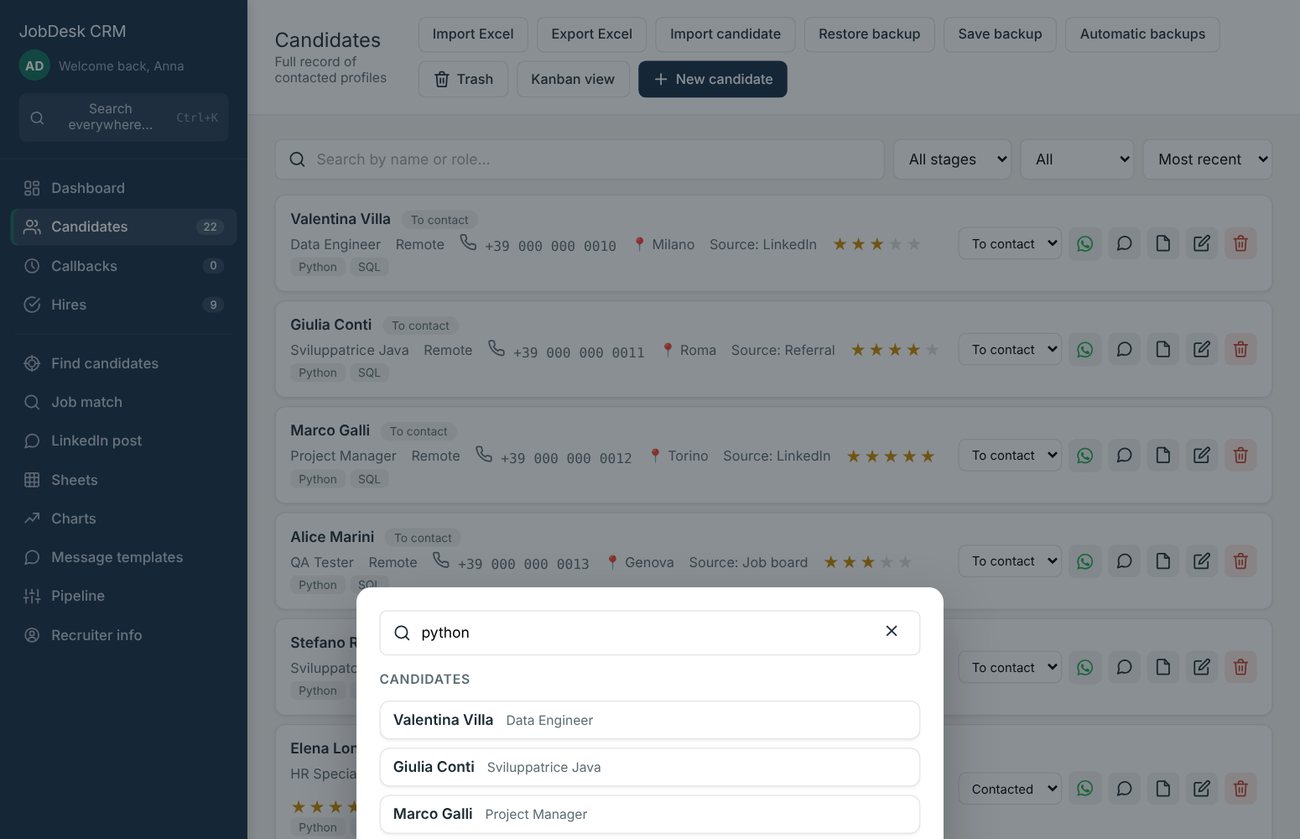
One box to search candidates, sheets and templates from any page of the program. One click and the right record opens.
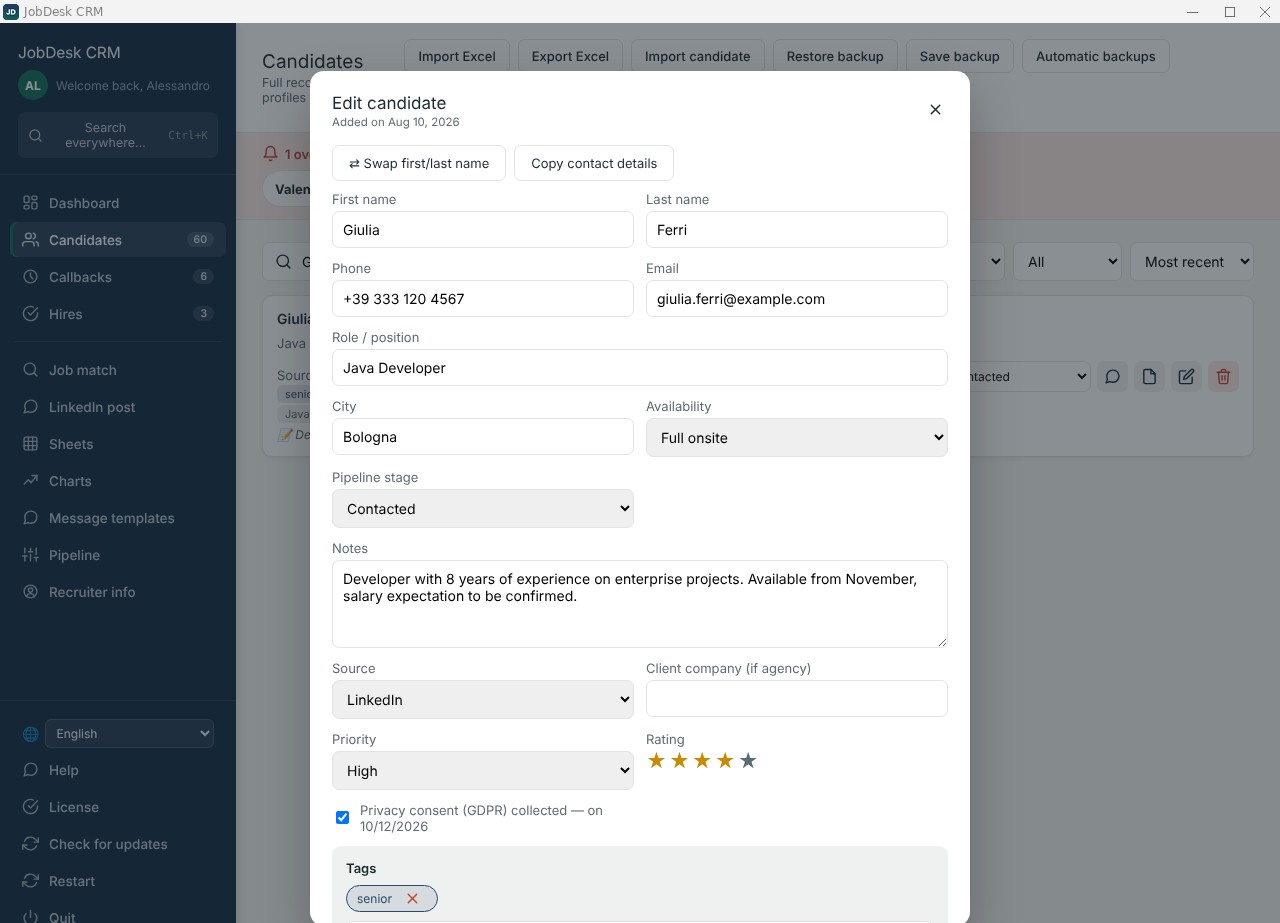
Manage candidates at every stage of hiring: contacts, role, availability, pipeline, source, client, notes, resume and privacy consent.
Callbacks, worksheets, messages and charts are all built into the same environment, so you can move from one task to the next without switching tools.
See JobDesk CRM in action →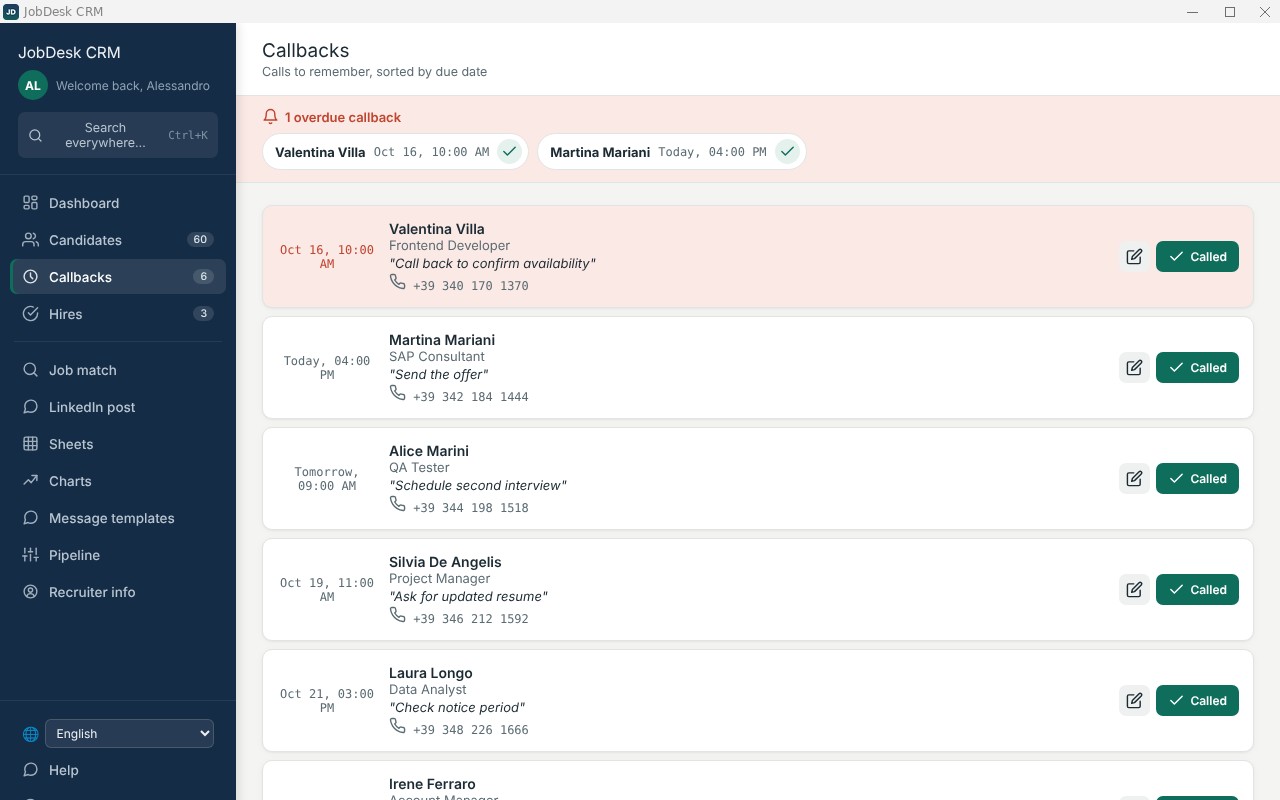
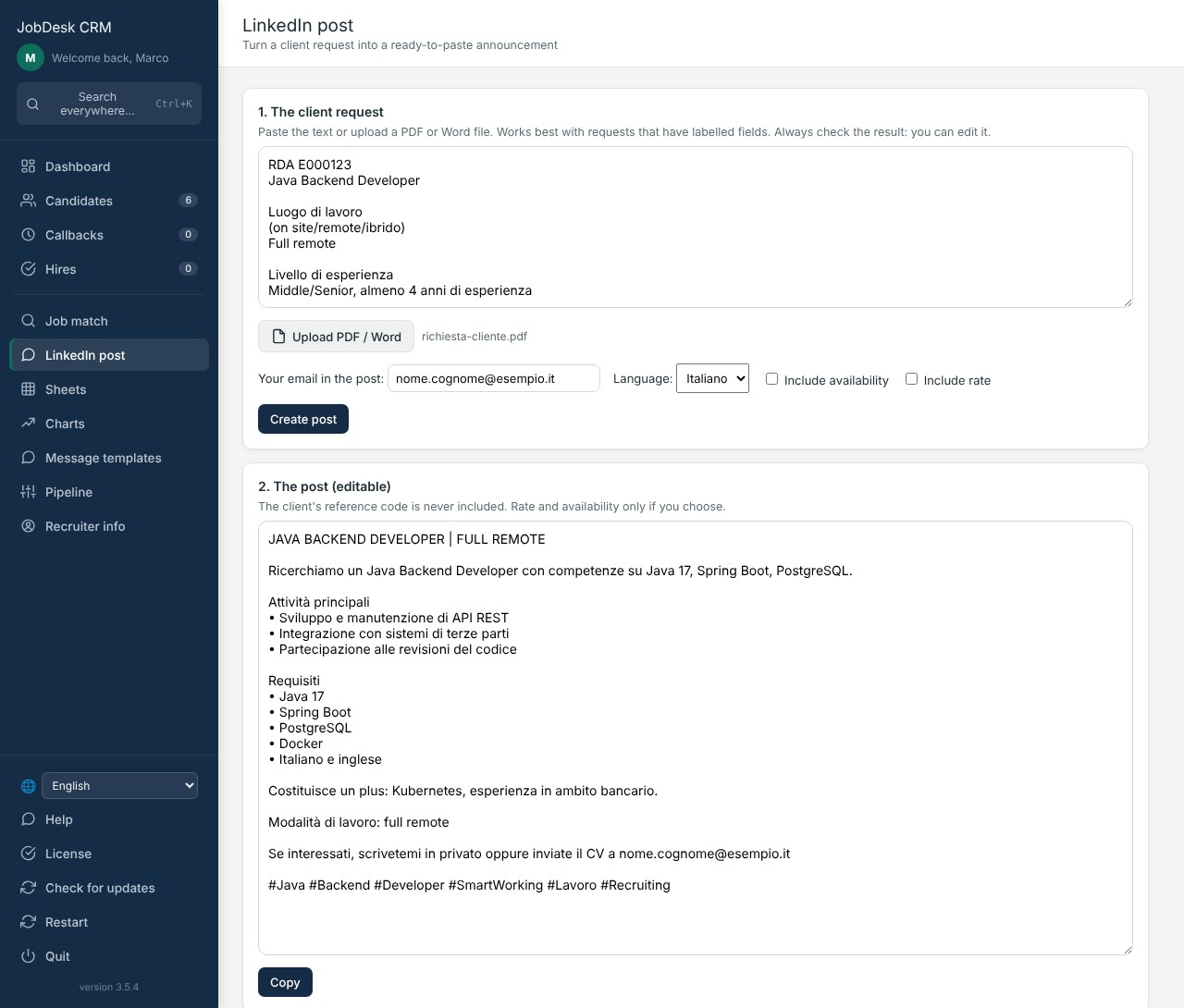
Paste the text or upload the request as PDF or Word: the program prepares an announcement with title, activities, requirements, work mode and your contact. You read it, tweak it and copy it to LinkedIn.
Open the feature you are interested in. For screenshots and step-by-step guidance, see the manual.
Read the full manual →
Name, phone, email, city, role and availability (on-site, hybrid, remote). Plus pipeline stage, source, client company if you work for third parties, star rating and colored tags.
You decide the stages: add, rename, reorder or delete them. See candidates as a list or in Kanban and drag them from one stage to another.
Upload a PDF or Word resume and the program recognizes name, phone, email, city, role and skills, and fills the empty fields. Fields already filled are never overwritten. Always check the data before saving.
If the name comes out inverted from the resume, one click swaps it. “Copy contact data” puts name, city, phone and email on the clipboard, ready to paste.
Attach a second version of the resume without personal data, to use when you present the candidate to the client.
Free notes and a dated history for every call or update. You record the GDPR consent and the program reminds you when it is missing.
“Export candidate” saves the whole record, resumes included, in a file. A colleague using the same program loads it with “Import candidate”.
Import and export in Excel, even just the candidates you choose. Deleted candidates stay recoverable for 30 days.
Paste the position (or upload a PDF or Word file) and the program extracts role, skills and years of experience. Then it prepares searches on Google and Bing, by city and skill combinations. You run them in your own browser.
Copy the results page (Ctrl+A, Ctrl+C) and press “Paste and read”: cards appear with name, role, company, city and the skills found, with a score. New profiles are added without duplicates.
Search 21 countries or worldwide. The program switches the LinkedIn subdomain by itself. Messages are in Italian for Italy and in English for other countries, but you can change the language at any time.
For each profile the program prepares the note to attach to the connection request (within LinkedIn’s 300 characters) and the message after acceptance. You copy and send them yourself: the program sends nothing on its own.
An icon next to each candidate opens the chat with the message ready, in the browser or in the app. Numbers with + or 00 are used as they are, otherwise your default prefix is used. “Mark as sent” writes a note in the history.
Templates for LinkedIn and email filled with your details. For the interview enter date, time and link (Teams, Zoom, Meet): the link stays clickable in Outlook and Gmail.
Paste a client request (or upload the PDF or Word file) and get an announcement to paste on LinkedIn, with title, activities, requirements and your contact. The client code and the rate stay out.
From any page, search candidates, sheets and templates. One click on the result opens the right record.
Paste the job description and the program extracts the requirements, which you can remove, add or make mandatory. You get a ranking with a percentage, found requirements and missing ones.
Upload a sheet with one row per position and compare candidates against all of them at once. For each position you see the top 10; for each candidate you see the positions they may fit. The result can be saved to Excel.
The match uses no online artificial intelligence and does not change candidate data. It reads the resumes once and then remembers them, so later comparisons are fast.
The percentage is an aid to decide where to start, not a judgment. A skill mentioned several times weighs more than one mentioned once. Required years of experience are shown but should be checked by hand.
Total candidates, overdue or due-today callbacks, hires and conversion rate. A notice flags anyone you have not contacted for over 14 days.
The list of calls to make in due-date order, with a Windows notification when the time comes.
A history of positions closed successfully, and charts by stage, by month and by source generated from your data.
Create sheets with text, number, date or pick-from-list columns with validation. Conditional colors, resizable rows and columns, and copy/paste with Excel in both directions.
Recent-sheets bar, full list with search, deletion of several sheets at once with an automatic safety copy before deleting.
Candidates, sheets and settings live in a folder separate from the program. Updating or uninstalling never touches it. The internet is only needed to activate the license.
Automatic safety copies (at most one every 6 hours, keeping the last 30), always available from the “Automatic backups” button. You can also save or restore a backup by hand.
If the PC shuts down suddenly, no file is left half-written. If a file gets damaged, the program restores the latest valid backup.
When a new version is out the program tells you and offers to install it, without touching the data you have already entered.
Free 14-day trial from the first launch. Then the program asks for the license key, valid for one PC. The trial can be downloaded and used on other computers too.
Change language at any time, with no restart: menus, records, messages, default stages and sources are translated.
A quick overview of JobDesk CRM's main features.
Check the user manual to discover every feature of the program, from installation to candidate management, backups and updates.
Read the manualCandidates, sheets and settings live in a separate folder on your computer. Uninstalling or updating the program never touches it. JobDesk CRM also automatically keeps the last 30 safety copies.
Download JobDesk CRM for free and install it on your Windows PC.
You have 14 days to see if it's right for you.
If you like it, you can buy the lifetime license for a one-time €79.
You'll receive the license key by email and enter it in the program to activate it.
Try them right here on the page. We save nothing: your data stays in your browser.
This is the same text the program prepares in Find candidates. LinkedIn accepts at most 300 characters.
In the program the text fills itself in with the candidate’s details and yours.
Enter what you pay today and how long you will use it. It is just arithmetic: you choose the numbers.
JobDesk CRM costs a one-time €79. The comparison does not account for other features of the programs you use today.
Guides, templates and a little game: no sign-up needed.
The real program with sample data, nothing to install (Italian interface).
A ready sheet to track candidates, plus the guide.
A 7-step method to never lose a good profile.
Stages, example and metrics to track.
Copy-ready templates: connection, follow-up, rejection, referral.
Find profiles with Google: formula, operators and 5 ready searches.
60 seconds to hire the right candidates. How high can you score?
| Subscription CRM (typical) | JobDesk CRM | |
|---|---|---|
| Cost | Monthly or yearly fee, often per user | €79, once |
| Your data | On the vendor’s servers | On your PC |
| Internet | Always required | Only to activate the license |
| If you stop paying | You lose access | The program stays yours |
The trial version is free for 14 days.
Download JobDesk CRM →Windows or your browser may show a warning (“isn't commonly downloaded”). This happens with new programs. Choose Keep, then More info and Run anyway.
One-time payment. No subscription.
Download the free trial and see if it can become your everyday tool.
Hi, I’m Alessandro. I work as a recruiter and I built JobDesk CRM because I wanted a simple tool of my own, with no subscription and with the data on my computer. I use it every day and keep improving it based on what people who hire really need.
Write to me, I reply myself →Pick a topic, write your message and your email opens ready to send. No data goes through this page.
Each license is for a single PC. The 14-day free trial, however, can be downloaded and used on other computers too, so you can check it works where you need it before buying.
14 days from first launch, then the program asks for a license to continue.
Yes. The message (“isn't commonly downloaded” in Edge, “Windows protected your PC” when opening) appears for new or little-used programs and does not mean there is a problem with the file. In your browser choose Keep (in Edge: the three dots next to the file, then Keep and Keep anyway). When the blue Windows screen appears, click More info and then Run anyway. The program runs on your computer and your data stays local.
No. The full license costs a one-time €79 and is lifetime.
JobDesk CRM is designed to work offline and your data stays on your PC. An internet connection is only needed to activate the license the first time.
The current version is built for Windows.
Yes, JobDesk CRM is available in Italian and English. You can switch languages at any time from the program's menu, with no reinstalling needed.
Updates never touch the separate folder where your data and settings are stored.
After purchase you'll receive the license key by email: paste it into the program on first launch to activate it.
Before buying, you get 14 days of free trial to check that the software fits your needs, with no commitment. Because of this, once the purchase is completed and the digital license has been delivered, refunds are not available: the purchase is considered final.
See JobDesk CRM
in action.
Follow us on social media and watch our tutorials to discover all the features of the software.
Instagram
Tutorials, news and demos
FollowTikTok
Practical videos and features
FollowLearn how to use JobDesk CRM through our videos.